css
CSS의 클래스 명명규칙 BEM에 대해서
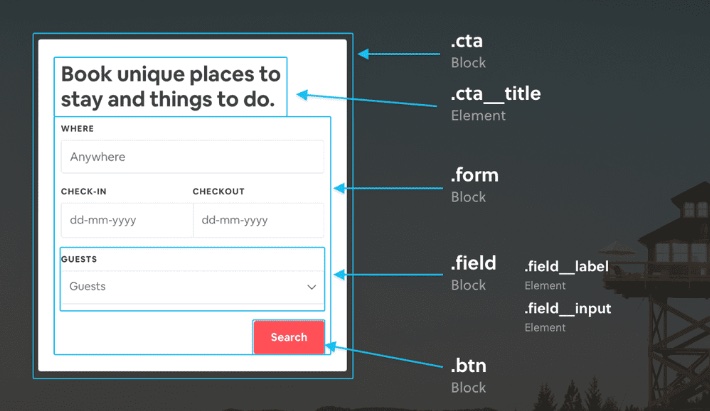
CSS의 클래스 명명규칙중에 BEM(Block Element Modifier) 방식이 있다.
이는 클래스 이름을 block__element--modifier 의 구조로 관리하는 방법론이다
설명
Block
- 종속되지 않음
- 재사용 가능
Element
- Block에 종속된다
- 재사용 가능
- 하나의 컴포넌트로 떼어서 사용할수있지만 Block에 종속되어서 사용될수있는 경우 Element라고 생각
Modifier
- Block이나 Element가 다른 요소와 다른 부분이 있는 경우 사용한다 --not-bold등
재사용이 가능하고 어딘가에 종속되어 있지 않은, 기능적으로 독립적인 컴포넌트이다
예시
HTML
- 요소의 하위 요소에 속한다고 상위요소의 Block--하위요소의 Block 형식으로 할 필요는 없다
<!-- 카드 블록 -->
<div class="card card--featured">
  <h2 class="card__title">특별 카드</h2>
  <p class="card__description">
    이 카드는 강조되어 있습니다.
    <p class="card_message"> 하위요소지만 깊이를 나타내지 않는 이름 card_message 가 사용되었다  card__description_message가 아니라
    </p>
  </p>
  <button class="card__button card__button--primary">자세히 보기</button>
</div>

<!-- 프로필 블록 -->
<div class="profile">
  <img src="profile.jpg" alt="프로필 이미지" class="profile__avatar" />
  <div class="profile__info">
    <h3 class="profile__name">홍길동</h3>
    <p class="profile__bio">프론트엔드 개발자. UI/UX에 관심이 많습니다.</p>
  </div>
</div>
CSS
/* 카드 블록 */
.card {
  border: 1px solid #ccc;
  padding: 16px;
  border-radius: 8px;
  margin-bottom: 20px;
  background-color: white;
}

.card--featured {
  border-color: gold;
  background-color: #fff8dc;
}

.card__title {
  font-size: 1.5em;
  margin-bottom: 8px;
}

.card__description {
  font-size: 1em;
  color: #666;
}

.card__button {
  padding: 8px 12px;
  border: none;
  border-radius: 4px;
  cursor: pointer;
}

.card__button--primary {
  background-color: royalblue;
  color: white;
}

/* 프로필 블록 */
.profile {
  display: flex;
  align-items: center;
  border: 1px solid #ddd;
  padding: 12px;
  border-radius: 8px;
  background-color: #f9f9f9;
}

.profile__avatar {
  width: 60px;
  height: 60px;
  border-radius: 50%;
  margin-right: 12px;
}

.profile__info {
  flex: 1;
}

.profile__name {
  font-size: 1.2em;
  margin: 0;
}

.profile__bio {
  font-size: 0.9em;
  color: #555;
}